HostCrew
  • 0 Shopping Cart
  • Home
  • Store
    • Browse All
    • Business Class Hosting
    • Self-managed Hosting
    • Dedicated Servers.
    • SSL Certificates
    • Hosting
    • Services
    • WordDedi
    • Register a New Domain
    • Transfer Domains to Us
  • Announcements
  • Knowledgebase
  • Network Status
  • Affiliates
  • Contact Us
  • More
  • Account
    • Login
    • Forgot Password?
  1. Portal Home
  2. Knowledgebase
  3. Web Edit Wizard - Tutorials
  4. Help with configuring Plug-ins
  5. Autos - Plug-in

  Categories

Clearing Cache
2
Email
8
Web Edit Wizard - Tutorials
16
WEW Text Editor
4

  Categories

  Support

My Support Tickets
Announcements
Knowledgebase
Downloads
Network Status
Open Ticket

Autos - Plug-in Print

  • 0

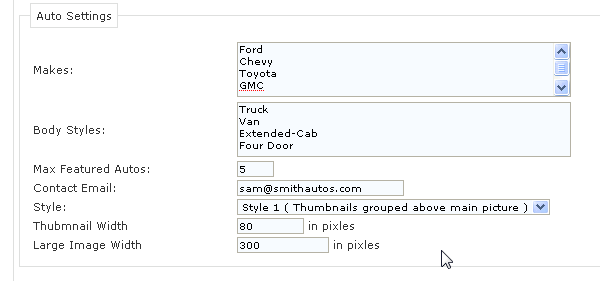
1.  At the Auto's plugin home, find the menu section and click on "Configuration". Choose 'Makes', 'Body Styles', 'Max Featured Autos', 'Contact Email' (where you want customers to send emails about vehicles), 'Style' (1 or 2), 'Thumbnail Width' and 'Large Image Width'.


Was this answer helpful?

Related Articles

Articles - Plug-in At the Articles plugin home, find the menu section and click on "Configuration". The only... Contact Us - Plug-in At the Contact Us plugin home, find the Form Settings section. Choose a contact email,... FAQ's (Style 1 and 2) - Plug-in At the FAQ's plugin home, find the menu section and click on "Configuration". In the Faq Settings... Links - Plug-in At the Links plugin home, find the menu section and click on "Configuration". Under the Link... Calender - Plug-in At the Calender plugin home, find the menu section and click on "Configuration". Under...
« Back

  Support

My Support Tickets
Announcements
Knowledgebase
Downloads
Network Status
Open Ticket
  • Contact Us
  • Terms of Service

Copyright © 2026 HostCrew. All Rights Reserved.


Loading...
Loading...

Choose Currency

$ USD
$ CAD

Generate Password

Enter a number between 12 and 64 for the password length.